Is this math app appropriate for a 3-year-old beginner?
Yes. Children can start with small numbers, tapping to count, and simple shape matching. Everything is spoken aloud, so they need no reading skills to explore on their own.
Home Preschool Math App
Meet Anvi is an ad-free offline early math app for children aged 3 to 6. From counting real-looking objects up to 100 to sorting geometric shapes and solving gentle visual puzzles, Anvi nurtures mathematical thinking through calm, pressure-free play.
Young children don't develop true number sense by memorizing flashcards or repeating abstract equations like "2 + 2 = 4". Early cognition requires touching objects, hearing verbal counts, and connecting physical quantities to visual symbols.
In Meet Anvi's Count activity, each tap adds a star and the app says the number aloud, so children hear the count as they watch the quantity grow, up to 100.
This tap-and-hear rhythm supports one-to-one correspondence and cardinality (understanding that the last number counted represents the total quantity), an early building block for later math.

These four areas move from physical recognition toward simple reasoning:
Large numerals, spoken numbers and stars to tap and count, from 1 up to 100, with celebrations at 5, 10, 20, 50 and 100.
Sorting circles, squares, triangles, and rectangles into matching silhouettes trains spatial reasoning, orientation, and geometric property awareness.
Dragging everyday objects into the color they belong to reinforces attribute sorting and early categorizing.
In Math Wizard (Anvi Plus): comparing quantities ("which has more?"), matching a group to its numeral, finding a missing number, and completing patterns.
These are typical ranges, not a test, and children vary widely. Math Wizard (Anvi Plus) starts at the level a parent picks (Preschool, LKG or UKG) and moves each skill up or down as the child plays.
| Age / Level | Typical Numeracy Milestones | Typical Spatial & Logic Milestones | In Meet Anvi |
|---|---|---|---|
| Age 3 (Preschool / Nursery) | Rote counting to about 10; understanding "one" and "more". | Naming circles and squares; sorting by color. | Count (tap-to-count stars); Blocks shape matching; Math Wizard Preschool level: number sense through objects, up to 5. |
| Age 4 (LKG / Pre-K) | Counting to about 20–30; one-to-one correspondence; recognizing numerals. | Telling triangles and rectangles apart; simple repeating patterns. | Count; Art color matching; Math Wizard LKG level: quantity to numeral up to 10, first sums. |
| Age 5 (UKG / Kindergarten) | Counting toward 50; comparing quantities (more, fewer). | Noticing shape attributes (sides, corners); sorting by more than one attribute. | Math Wizard UKG level: early problem solving, sums within 10, counting toward 20. Count continues to 100. |
| Age 6 (Grade 1 Prep) | Counting to 100; early adding and taking away with objects. | Combining shapes; multi-step puzzles. | Meet Anvi's top level is UKG, so Count, Blocks, Art and UKG Math Wizard stay available. It is not a Grade 1 curriculum. |
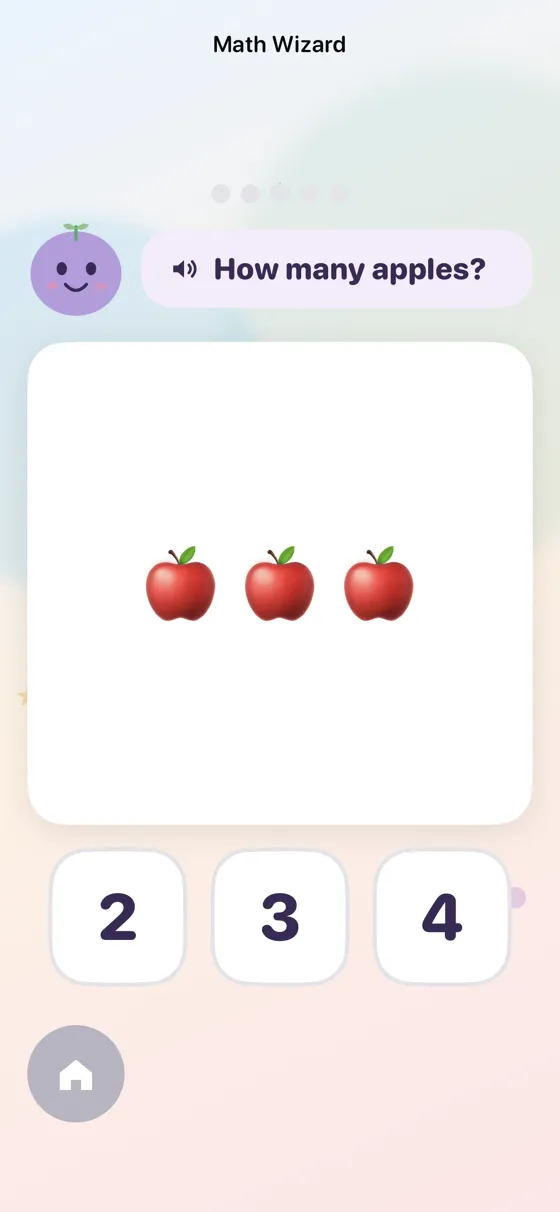
For families who want to take math further, Math Wizard introduces bite-sized 5-puzzle adventures designed to stretch reasoning without causing anxiety.
Missions prompt children to answer intuitive visual challenges: "How many apples are on the tree?", feed friendly characters exact amounts, compare quantities ("which basket holds more?"), and complete train color patterns.
Every puzzle is accompanied by friendly spoken narration. There are zero penalties for incorrect taps—children simply receive gentle spoken encouragement to inspect the clues and try again.
The Concrete-Pictorial-Abstract approach builds on Jerome Bruner's work on how children represent ideas, and it is widely used in early math teaching. It moves through three stages:
Children interact with tangible objects they can touch and see. In Meet Anvi, tapping stars and counting objects in Math Wizard ties numbers to things children can see.
Visual diagrams, dot sets, and arranged collections help children visualize mathematical relationships and quantity groupings without physical objects.
Only after mastering concrete and pictorial representations does the child connect concepts to abstract written numerals (0, 1, 2...) and operational symbols.
Many parents worry about pressure in early math. Some apps use countdown timers, error buzzers or flashing ads, which can make practice feel stressful. Meet Anvi is designed to avoid all three.
Reinforce what your child discovers on screen with these simple, zero-cost real-world activities you can play throughout the day:
While setting the table, ask your preschooler: "We have four people eating. Can you count out four spoons?" This grounds cardinality in purposeful family routines.
During a walk around the neighborhood, challenge your child to spot geometric shapes in the wild: circular manhole covers, rectangular doors, and triangular roof gables.
Turn sorting laundry into a patterning game: lay out red sock, blue sock, red sock, and ask: "Which color comes next?" This trains foundational algebraic sequencing.
Put 3 crackers on one plate and 5 on another. Ask: "Which plate has more?" This introduces comparing quantities without formal math notation.
| Feature | Meet Anvi | Paper Math Worksheets | Some Commercial Gamified Apps |
|---|---|---|---|
| Sensory Pace | Calm, voice-narrated, low-sensory | Static, non-interactive | Can include loud chimes, timers or flashing lights |
| Feedback Model | Gentle hints, celebratory stars | Requires adult grading / red ink | Can include error buzzers or lost lives |
| Self-Reliance | Spoken audio allows independent play | Requires adult to read directions | Varies by app |
| Offline Capability | 100% offline in Airplane Mode | Physical paper (portable) | Varies; some need a connection |
| Advertisements | 100% ad-free, zero tracking | None | Some show banner or video ads |
| Parent Controls | PIN gate, time limits, progress summary | Manual parent review | Varies by app |
Yes. Children can start with small numbers, tapping to count, and simple shape matching. Everything is spoken aloud, so they need no reading skills to explore on their own.
In the free app, Count lets children tap to count stars from 1 to 100 with spoken numbers and celebrations at 5, 10, 20, 50 and 100, Blocks sorts shapes, and Art matches objects to colors. With the optional Anvi Plus, Math Wizard adds short puzzles: counting and collecting, more or less, matching a group to its numeral, finding a missing number, patterns, shapes, simple adding and taking away, and story sums.
Not yet. Guided tracing in Meet Anvi covers the letters A to Z, not numerals. Reversing numbers such as 3 or 7 is common at this age and usually settles with practice; large strokes with a finger in sand or on paper are a good way to help.
Math Wizard is part of the optional Anvi Plus subscription, switched on by a parent behind the PIN. It offers short puzzles at three levels (Preschool, LKG and UKG). After a wrong answer, Anvi counts along with the child instead of showing a red cross.
No. Activities are self-paced and there is no countdown against the clock. Parents can set a daily time limit in the PIN-protected parent area, and the app winds down gently when time is up.
Yes. Counting, shapes, colors and Math Wizard run in Airplane Mode on iPhone and iPad. An internet connection is only needed to sign in and sync progress across devices.
Yes. The parent dashboard behind your PIN includes a weekly summary and a skills heat map that shows strengths and gaps for each child.
The American Academy of Pediatrics suggests no more than about one hour a day of high-quality screen time for children aged 2 to 5, ideally shared with a parent. Meet Anvi lets you set a daily limit behind the PIN.