How it works
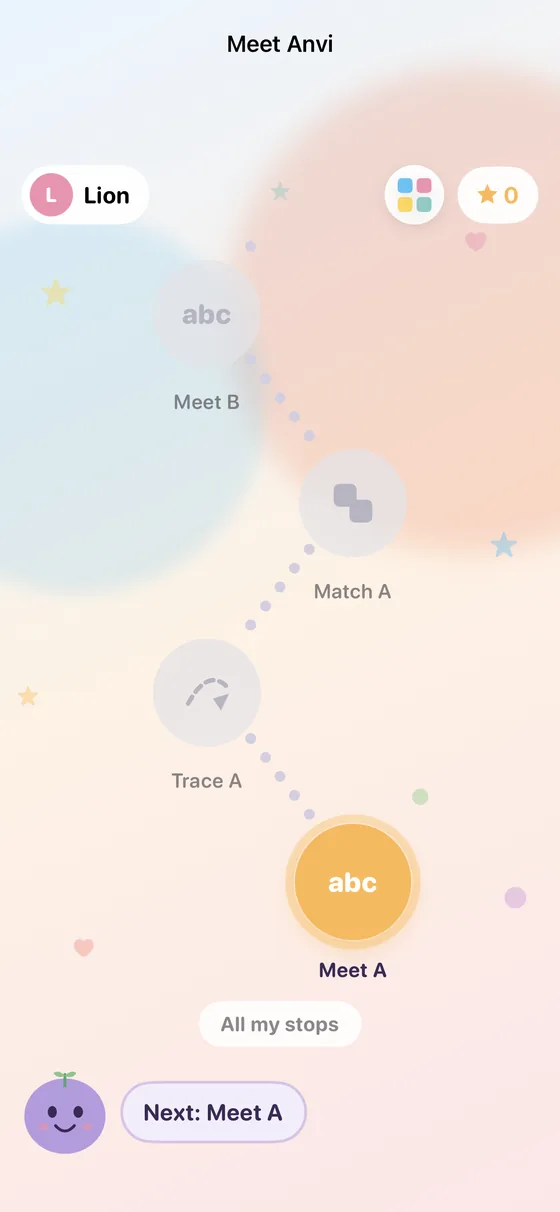
- Anvi picks. The next stop glows and Anvi says it out loud. Stops further ahead are there to see but asleep, never behind a padlock.
- Your child plays. One tap starts a short activity: meet a letter, trace it, match it, count to a number, make with blocks, colour, draw or read a story.
- A little celebration. Finish a stop and the next one is offered with one big button. After five stops Anvi suggests a rest, and finishing a chapter or a level gets its own moment.
Three levels
The path is for ages 3 to 6 and comes in three levels: Preschool, LKG and UKG. A new child starts at the first stop of their level, and a child who has already played is placed where they have got to, so nobody does it again.
Free play
The old grid of activities is still there as Free play, one small button away, for the child who wants to choose.
For parents
You pick your child's level in their profile and, under Controls, whether they may skip ahead (off unless you turn it on). Thinking and Math Wizard join the path only after you switch them on, and look like any other stop. Where your child is on the path stays on the device.